
A few weeks back, a firm brought me in for a routine health check of their SQL Servers on AWS. Nothing was on fire. Production was solid. This was the good kind of engagement, where you look around before something breaks.
While going through their documentation, one runbook entry caught my eye. It said, if the DEV SQL Server is down in the morning, open Disk Management, bring the new disk online, format it as D, create the tempdb folder, and start SQL. I asked the ops team about it. They told me this had started a few months back, right after they set up automation to stop DEV instances overnight to save on cost. Some mornings after that, SQL would be down. Someone had figured out that by trial and error that setting up the disk again brought it back, so it went into the runbook and life moved on. They blamed the shutdown automation and planned to raise it with AWS someday.
I want to be clear that this team was not careless. The workaround worked every time, DEV was usable by 9:30, and everyone had real work to do. This is exactly how these things survive in companies. A fix that works well enough removes the pressure to ask why.
But that runbook entry bothered me. Why would a disk keep turning into a blank one? I logged in after the next bad morning and checked for myself. The SQL error log showed error 5123,
CREATE FILE encountered operating system error 3, the system cannot find the path specified, could not create tempdb.
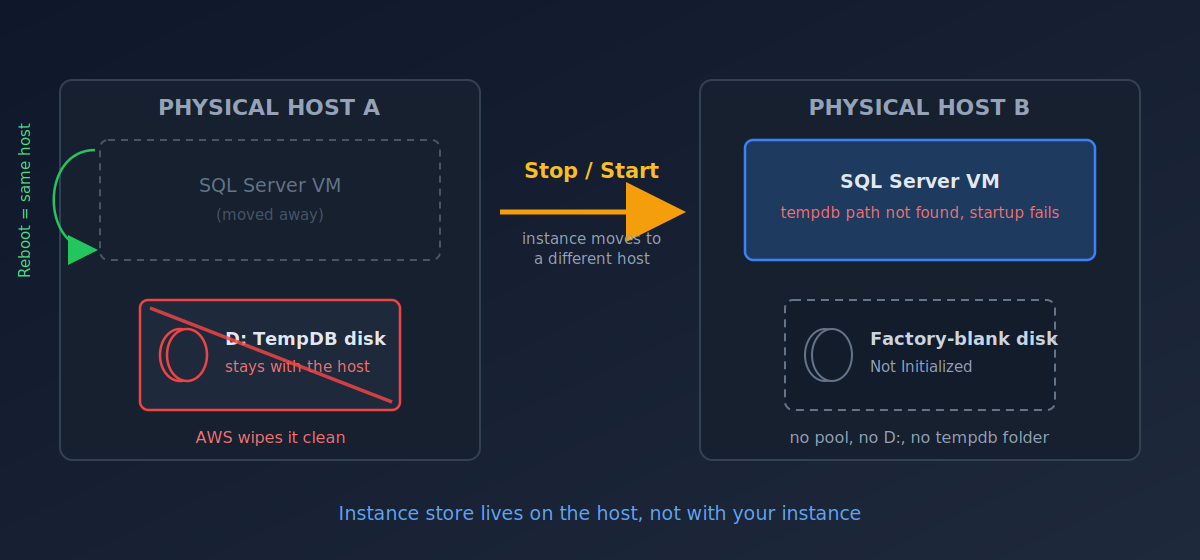
And in Disk Management, there was no D drive. In its place sat a raw disk. Unknown, Not Initialized, 109 GB of unallocated space. As if someone had pulled out the old disk and put in a blank one from the factory.
Which as I confirmed later in the AWS documentation, is more or less exactly what had happened.
The tempdb drive on these servers was instance store, the ephemeral storage that comes physically attached to the EC2 host. A very good choice for tempdb. It is fast, it costs nothing extra (I know AWS has already charged for it in server cost, that how they hide the cost hahaha), and tempdb is rebuilt at every SQL startup anyway, so nobody needs the old data to survive.
But instance store has one detail that catches teams out. It survives a reboot. It does not survive a stop/start. A reboot keeps the instance on the same physical host, so the disk and its data stay where they are. A stop/start usually moves the instance to a different host, and AWS wipes the disks left behind on the old one. The storage pool, the partition, the drive letter, the tempdb folder, all of it stayed on hardware nobody will ever see again. Windows boots on the new host and honestly reports what it finds there. A blank disk.
That one detail explained everything. The problem started when the overnight shutdowns started, because before that the server was only ever rebooted, never stopped. And it did not happen every morning, because a start sometimes lands you back on the same host. To the team it looked random, and random problems on a DEV box get a runbook entry, not an investigation.
It also explained why PROD never showed the problem. Production instances were never stopped, only rebooted. And when I checked those servers anyway, each one had a small PowerShell script with a startup scheduled task that rebuilt the whole disk at every boot. Pool the ephemeral disk, format it, assign the drive letter, create the tempdb folder, start SQL. The DEV server was supposed to have the same thing. It was missed during provisioning, and since DEV was never stopped in the early days, nobody ever found out.
I did not just copy their script across. I rewrote it with some protections I felt were missing, and this is the version I now leave behind at every engagement.
https://github.com/abhinavdb/scripts-dump/blob/main/AWS/Fix-TempDBDisk.ps1
Two decisions in this script matter more than the rest. First, it never guesses which disk to format. It only touches a disk whose hardware model matches the instance store signature and which has no partitions on it. If nothing qualifies, it exits and does nothing. A boot script that formats the wrong disk is a far worse morning than SQL being down. Second, it reinstalls itself and its scheduled task on every run, so even if someone deletes it by accident, the next boot repairs the damage.
Because the real lesson from this engagement was not about ephemeral disks. It was that a manual workaround in a runbook is often a root cause. The team was doing my script’s job by hand every morning without knowing it.
If you run SQL Server on EC2 with tempdb on instance store, go and check today whether that startup script actually exists on every server, and not just on the one where it was originally written. A stop/start is the cheapest way to find out. It is also the worst.
Best Regards
Abhinav